Managing K8s secrets with Azure Key Vault provider for Secrets Store CSI Driver
Kubernetes
Kubernetes, also known as K8s, is an open-source system for automating deployment, scaling, and management of containerized applications.
Secrets in K8s
A Secret is an object that contains a small amount of sensitive data such as a password, a token, or a key. Such information might otherwise be put in a Pod specification or in a container image.
You can use Secrets for purposes such as the following:
Environment Variables as secrets
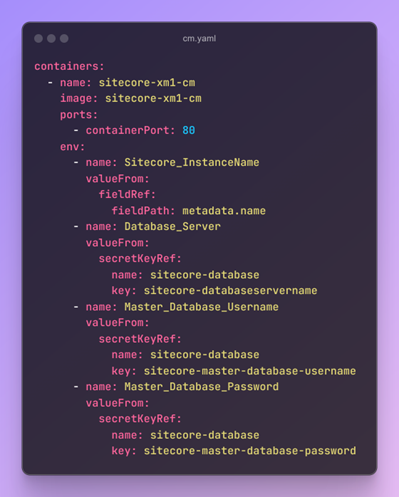
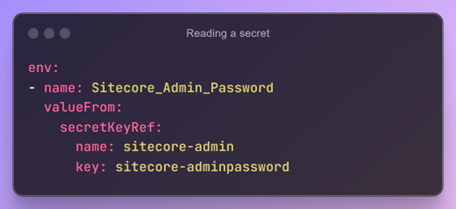
Environment variables of a container(Pod) can be stored as K8s secrets. These secrets are stored in base64-encoded format, although they are not encrypted by default. You can create secrets manually using YAML manifests or directly from the command line. In a Kubernetes Pod or Deployment, you can inject the secret values as environment variables to be accessed by the application.
Kubernetes Secrets Store CSI Driver
Secrets Store CSI Driver for Kubernetes secrets - Integrates secrets stores with Kubernetes via a Container Storage Interface (CSI) volume.
The Secrets Store CSI Driver secrets-store.csi.k8s.io allows Kubernetes to mount multiple secrets, keys, and certs stored in enterprise-grade external secrets stores into their pods as a volume.
Azure Key Vault provider for Secrets Store CSI Driver
Azure Key Vault offers several key security advantages, such as:
Centralized management of sensitive data.
Strong data encryption capabilities
Access controls and monitoring
Integrating Azure Key Vault with AKS brings additional benefits, including:
Secure data storage and access
Simple and seamless integration
Support for regulatory compliance
Steps to Enable the Azure Key Vault provider for Secrets Store CSI Driver
Create or update an AKS cluster with Azure Key Vault provider for Secrets Store CSI Driver support.
Create a User-assigned managed identity, with access to read the desired Key Vault.
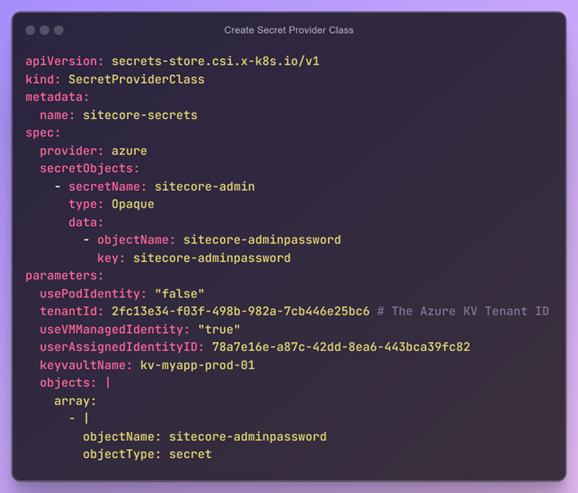
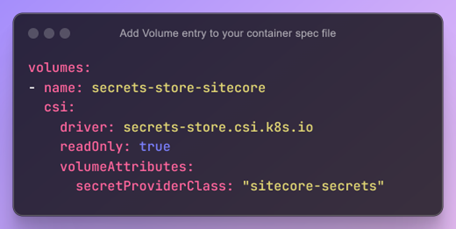
Create a SecretProviderClass CRD (Custom Resource Definition) and a Pod that consumes the CSI provider to test the connection.
References
• Kubernetes Secrets Store CSI Driver - https://github.com/kubernetes-sigs/secrets-store-csi-driver
• https://learn.microsoft.com/en-us/azure/aks/csi-secrets-store-driver
• https://secrets-store-csi-driver.sigs.k8s.io/introduction
• https://azure.github.io/secrets-store-csi-driver-provider-azure/docs/
Happy Sitecoring!